Networking core concepts#
OSI Model (7 layers)#
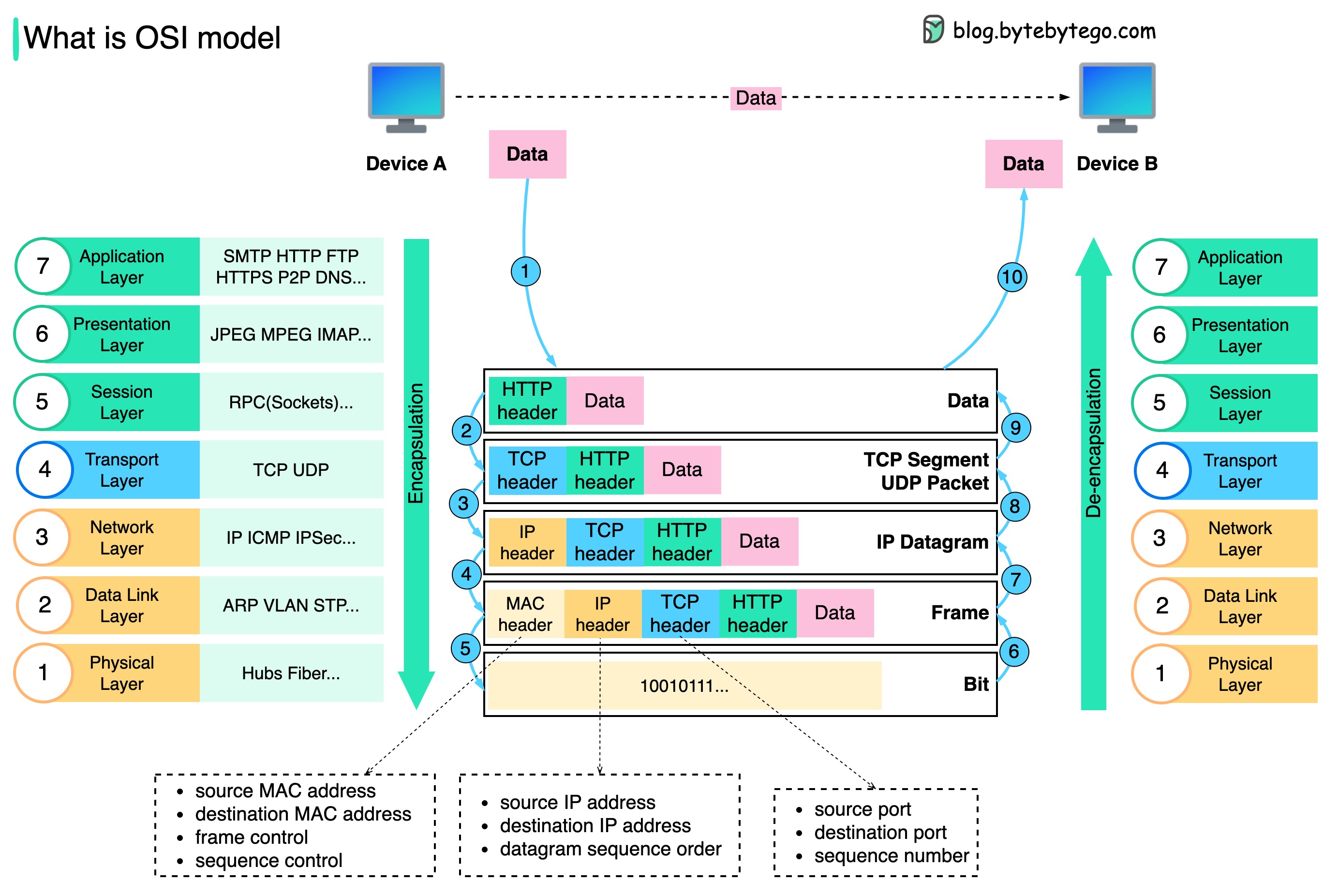
- L1 – Physical: Cables, NICs, bits.
- L2 – Data Link: MAC addresses, switches, VLANs, STP.
- L3 – Network: IP, routing, subnets, CIDR, ARP.
- L4 – Transport: TCP/UDP, ports, handshake, retransmission.
- L5 – Session: Connection management. Rare in practical ops.
- L6 – Presentation: Encryption, compression, TLS framing.
- L7 – Application: HTTP, DNS, SMTP, gRPC.
Key Interview Tip#
- OSI layers help troubleshoot: “Which layer is failing?”
- Map protocols to layers (HTTP → L7, TLS → L6, IP → L3, etc).
TCP/IP Model (4 layers)#

- Link (L1–L2): Ethernet, ARP.
- Internet (L3): IP, ICMP, routing.
- Transport (L4): TCP/UDP.
- Application (L5–L7): HTTP, DNS, SSH.
Important Concepts#
- TCP: reliable, handshake, congestion control.
- UDP: fast, no guarantee, used for DNS, streaming, VoIP.
- ICMP: used for ping/traceroute, path discovery.
IP Addressing#
- CIDR: /24 = 256 hosts, /16 = 65k hosts.
- Subnetting: dividing network segments for isolation/performance.
- Private IP ranges: 10/8, 172.16/12, 192.168/16.
- VPC (cloud): routed private networks; no L2 broadcast.
Routing & Switching#
Switching (L2)#
- Forwards frames by MAC table.
- VLAN segments networks.
- STP prevents loops (root bridge, blocked ports).
Routing (L3)#
- Routers forward packets using routing tables.
- Static routing: manual.
- Dynamic routing: BGP, OSPF.
- NAT: translates internal IP → public IP (SNAT, DNAT).
DNS Essentials#

- Converts names → IP.
- Record types: A, AAAA, CNAME, MX, TXT, NS, SRV.
- TTL controls caching.
- Common issue: stale DNS caches.
- Use
dig,nslookup,host.
HTTP/HTTPS Essentials#
- Stateless, request/response.
- Methods: GET, POST, PUT, PATCH, DELETE.
- Status codes: 2xx OK, 3xx redirect, 4xx client error, 5xx server error.
- HTTPS adds TLS handshake + encryption.
TLS#
- Uses asymmetric cryptography for handshake.
- Certificates: chain, CA, trust store.
Load Balancing#
OSI Layers#
- L4 LB (Transport): TCP/UDP based. HAProxy, NLB, LVS/IPVS.
- L7 LB (Application): HTTP-aware. Nginx, Envoy, ALB, Traefik.
Key Algorithms#
- Round-robin.
- Least connections.
- Weighted round-robin.
- IP-hash (sticky).
- Random with two-choices (modern default).
Key Features#
- Health checks (HTTP/TCP).
- Session persistence.
- TLS termination/offloading.
- Rate limiting, WAF (L7 only).
- Connection draining.
Reverse & Forward Proxies#
Reverse Proxy#
- Client → proxy → backend service.
- Used for load balancing, caching, TLS termination, auth.
- Examples: Nginx, Envoy, Traefik, HAProxy.
Forward Proxy#
- Client → proxy → arbitrary internet.
- Used for egress control, filtering, anonymity.
- Examples: Squid, corporate proxies.
NAT & Firewall Basics#
NAT Types#
- SNAT: internal → external.
- DNAT: external → internal.
- PAT/Masquerade: many → one IP.
Firewalls#
- L3/L4 filtering: IP, port, protocol.
- Stateful vs stateless.
- Tools: iptables, nftables, ufw, AWS SG/NACL.
TCP Essentials#
- 3-way handshake: SYN → SYN/ACK → ACK.
- Flags: SYN, ACK, FIN, RST, PSH.
- Slow start: congestion control.
- Retransmissions when packets drop.
- Keepalive prevents dead connections.
Common Issues#
- SYN backlog full → connection timeouts.
- High RTT → slow performance.
- MTU mismatch → packet fragmentation/blackholes.
UDP Essentials#
- Unreliable, unordered, no retransmits.
- Used for DNS, video, VoIP, QUIC.
- No handshake → low latency.
MTU & Packet Fragmentation#
- Default Ethernet MTU: 1500 bytes.
- Tunnel/VPN reduces MTU.
- PMTUD helps discover correct MTU.
- Wrong MTU → “can’t load some websites”, “stalled connections”.
VPN & Tunneling#
- Encapsulate traffic across networks.
- Types: IPSec, WireGuard, OpenVPN.
- Overhead reduces MTU.
- Often used for inter-VPC or DC-to-DC secure links.
1. OpenVPN#
The classic, battle-tested one
- Creates an encrypted tunnel over TCP or UDP.
- Uses TLS certificates (like HTTPS) to authenticate and encrypt traffic.
- Very configurable and secure, but a bit heavy and slower than newer options.
Think of it as a secure armored truck — reliable, proven, but not the fastest.
2. WireGuard#
The modern, fast, minimalist VPN
- Uses state-of-the-art cryptography with very little code.
- Works by exchanging public keys (similar to SSH).
- Keeps the tunnel simple → faster speeds, lower latency, fewer bugs.
Think of it as a secure racing bike — light, fast, elegant.
3. IPsec / IKEv2#
The enterprise-grade, stable VPN
- IPsec encrypts traffic at the network layer.
- IKEv2 handles key exchange and reconnection.
- Very good at handling network changes (Wi-Fi ↔ mobile).
Think of it as a smart highway system — strong, stable, great for mobile users.
4. L2TP/IPsec#
The older combo protocol
- L2TP creates the tunnel, IPsec adds encryption.
- Secure, but slower because data is wrapped twice.
- Mostly kept for legacy support.
Think of it as two envelopes around your data — safe, but bulky.
5. PPTP#
The outdated one (avoid it)
- Very fast but uses broken encryption.
- Easy to block and easy to break.
- Not considered secure anymore.
Think of it as a paper lock — better than nothing, but not safe.
6. SSTP#
Microsoft’s VPN
- Runs over HTTPS (TCP 443).
- Hard to block because it looks like normal web traffic.
- Mostly used on Windows systems.
Think of it as VPN disguised as HTTPS.
7. SoftEther#
The flexible multi-protocol VPN
- Can mimic HTTPS, OpenVPN, L2TP, etc.
- Designed to bypass firewalls and censorship.
- Very versatile but more complex to run.
Think of it as a VPN chameleon.
Quick summary table#
| Protocol | Speed | Security | Best use case |
|---|---|---|---|
| WireGuard | Very fast | Very strong | Modern VPNs, cloud, devs |
| OpenVPN | Medium | Very strong | Proven, configurable setups |
| IKEv2/IPsec | Fast | Strong | Mobile, enterprise |
| L2TP/IPsec | Slower | Strong | Legacy systems |
| SSTP | Medium | Strong | Windows, restrictive networks |
| PPTP | Fast | Weak | Avoid |
TLDR#
- Want speed + simplicity? → WireGuard
- Want maximum compatibility? → OpenVPN
- On mobile networks? → IKEv2/IPsec
- Old systems? → L2TP/IPsec
- Avoid PPTP
CDN Basics#
- Edge caching.
- Reduces latency and origin load.
- Key concepts: cache hit ratio, TTL, purge, invalidation.
Caching#
- Local caching: DNS, HTTP, OS caches.
- Proxy caching: Nginx/Envoy/Cloudflare.
- Cache-control headers: max-age, no-cache, etag.
Service Discovery#
- DNS-based (Kubernetes).
- Consul, etcd, Eureka.
- K8s: kube-dns / CoreDNS.
Common DevOps Networking Tools#
ping: reachability.traceroute,mtr: routing path.ss,netstat: sockets and ports.tcpdump,wireshark: packet capture.curl,wget: HTTP debug.dig,nslookup: DNS.nmap: port scanning.nc(netcat): TCP/UDP testing.iperf: bandwidth testing.
How to troubleshoot any network issue#
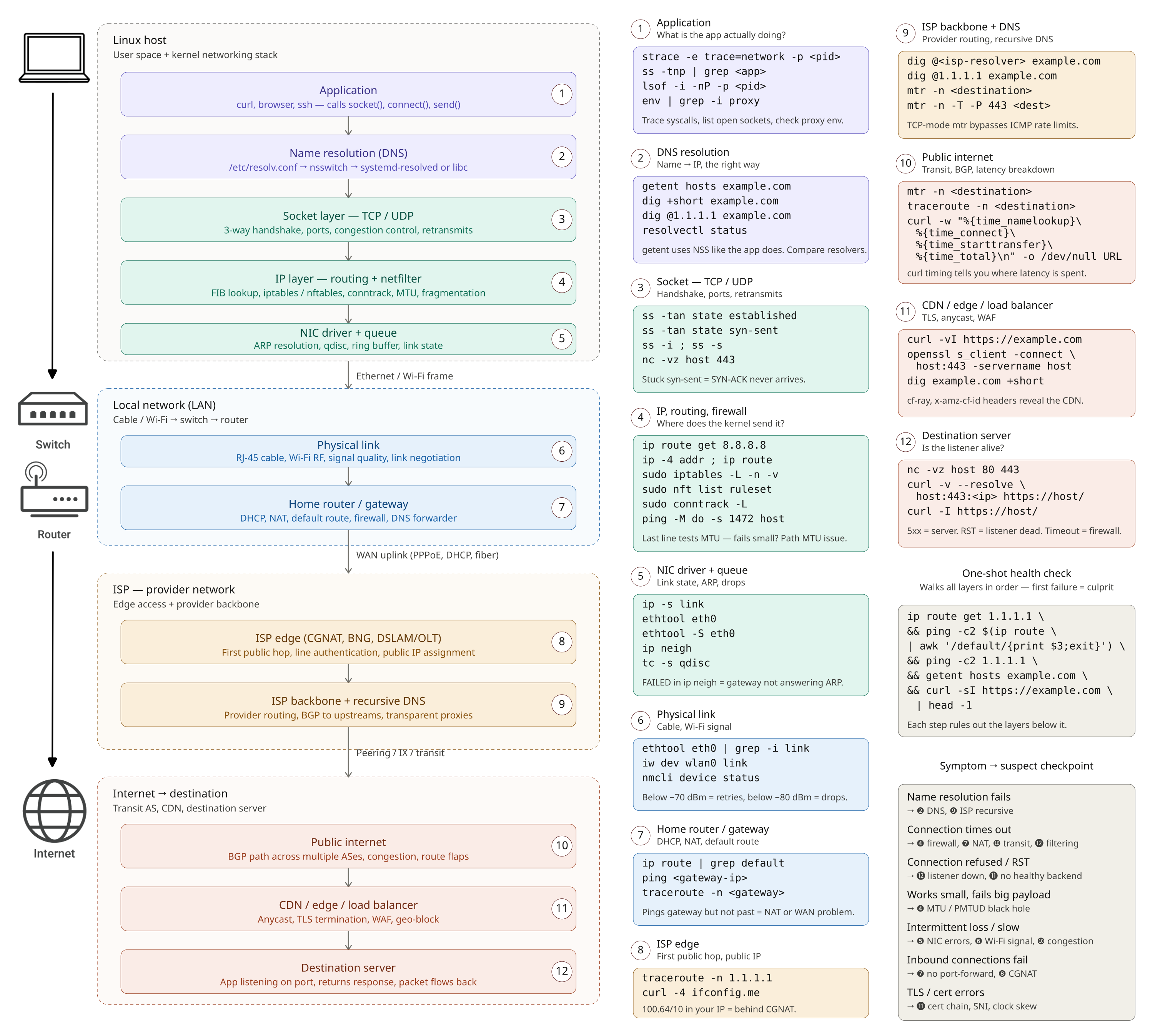
❶ Application — is the app actually trying to connect, and where?
strace -e trace=network -p <pid> traces the syscalls. ss -tnp | grep <app> shows what sockets the process holds. lsof -i -nP -p <pid> lists open network files. If the app silently does nothing, it’s usually a proxy env var (env | grep -i proxy) or a config pointing at the wrong host.
❷ DNS resolution — name → IP.
getent hosts example.com uses the same NSS path the app uses (more accurate than dig). dig +short example.com and dig @1.1.1.1 example.com compare your resolver against a public one — if the public one works and yours doesn’t, your resolver is broken. resolvectl status shows what systemd-resolved is actually using. Check /etc/resolv.conf and /etc/nsswitch.conf.
❸ Socket / TCP-UDP — handshake, ports, connection state.
ss -tan state established and ss -tan state syn-sent (the latter stuck = SYNs going out, no SYN-ACK back — firewall or routing). nc -vz host 443 tests if the port is reachable. ss -s gives a global socket summary. ss -i shows per-socket congestion info (rtt, retransmits, cwnd).
❹ IP / routing / netfilter — does the kernel even know where to send it?
ip route get 8.8.8.8 is the single most useful command — it tells you exactly which interface and gateway the kernel will use for that destination. ip -4 addr and ip -6 addr show your addresses. ip route shows the full table. sudo iptables -L -n -v and sudo nft list ruleset show firewall rules; sudo conntrack -L shows tracked connections. For MTU issues: ping -M do -s 1472 host (1472 + 28 = 1500 — if it fails but smaller works, you have an MTU problem).
❺ NIC driver + queue — link, ARP, drops.
ip -s link shows per-interface RX/TX errors and drops. ethtool eth0 shows link speed, duplex, and whether the cable is even detected (Link detected: yes). ethtool -S eth0 dumps driver counters (rx_crc_errors, tx_dropped). ip neigh shows the ARP/ND cache — FAILED entries mean the gateway didn’t answer ARP. tc -s qdisc shows queueing discipline drops.
❻ Physical link — cable, Wi-Fi RF.
ethtool eth0 | grep -i link for wired. For Wi-Fi: iw dev wlan0 link shows signal strength, bitrate, and the connected BSSID. iwconfig (legacy but still works). Below ~-70 dBm signal you’ll see retries; below ~-80 dBm the link drops. nmcli device status for the high-level view.
❼ Home router / gateway — DHCP, NAT, default route.
ping <gateway-ip> first (ip route | grep default to find it). If gateway pings but nothing past it does, NAT or WAN is the problem. Hit the router’s admin UI for WAN status, lease table, port forwarding. traceroute -n <gateway> should be one hop. Reboot the router only after you’ve checked logs — you lose the evidence.
❽ ISP edge — first public hop.
traceroute -n 1.1.1.1 — the second hop is typically the ISP edge. If it’s * * * from there on, the ISP is dropping. mtr -n 1.1.1.1 runs traceroute continuously and shows packet loss per hop — far better than a one-shot traceroute. curl -4 ifconfig.me shows your public IP (if it’s 100.64.0.0/10, you’re behind CGNAT and inbound connections won’t work).
❾ ISP backbone + recursive DNS — provider-side routing and resolution.
dig @<isp-resolver> example.com vs dig @1.1.1.1 example.com — if ISP’s resolver lies or is slow, switch to 1.1.1.1 or 9.9.9.9. mtr -n -T -P 443 <destination> does TCP-mode mtr on port 443 — many ISPs rate-limit ICMP, making regular traceroute look worse than reality.
❿ Public internet — transit, BGP, the parts you don’t control.
mtr -n <destination> to see exactly which hop loses packets. curl -w "@-" -o /dev/null -s https://example.com <<<'time_namelookup: %{time_namelookup}\ntime_connect: %{time_connect}\ntime_starttransfer: %{time_starttransfer}\ntime_total: %{time_total}\n' breaks down where the latency is spent. Check public looking-glass services or bgp.tools if you suspect a route problem.
⓫ CDN / edge / load balancer — TLS, geo, WAF.
curl -vI https://example.com shows TLS handshake, HTTP status, and response headers (look for cf-ray, x-amz-cf-id, server to identify the CDN). openssl s_client -connect host:443 -servername host inspects the certificate chain. If a site works from your phone (mobile network) but not from home, suspect a WAF block or geo-rule on your IP. dig example.com +short from different vantage points (or dig @1.1.1.1 vs @8.8.8.8) reveals anycast pointing you to different edges.
⓬ Destination server — is anyone home?
nc -vz host 80 443 tests common ports. curl -v --resolve host:443:<ip> https://host/ bypasses DNS to talk to a specific origin IP — perfect for confirming whether a single edge node is misbehaving. HTTP 5xx = server-side; connection reset = listener died or LB has no healthy backends; timeout = firewall silently dropping.
One-shot health check that touches most layers in order:
ip route get 1.1.1.1 && ping -c2 $(ip route | awk '/default/{print $3; exit}') && ping -c2 1.1.1.1 && getent hosts example.com && curl -sI https://example.com | head -1Each step that succeeds eliminates layers below it; the first failure is your culprit.
Cloud Networking Basics#
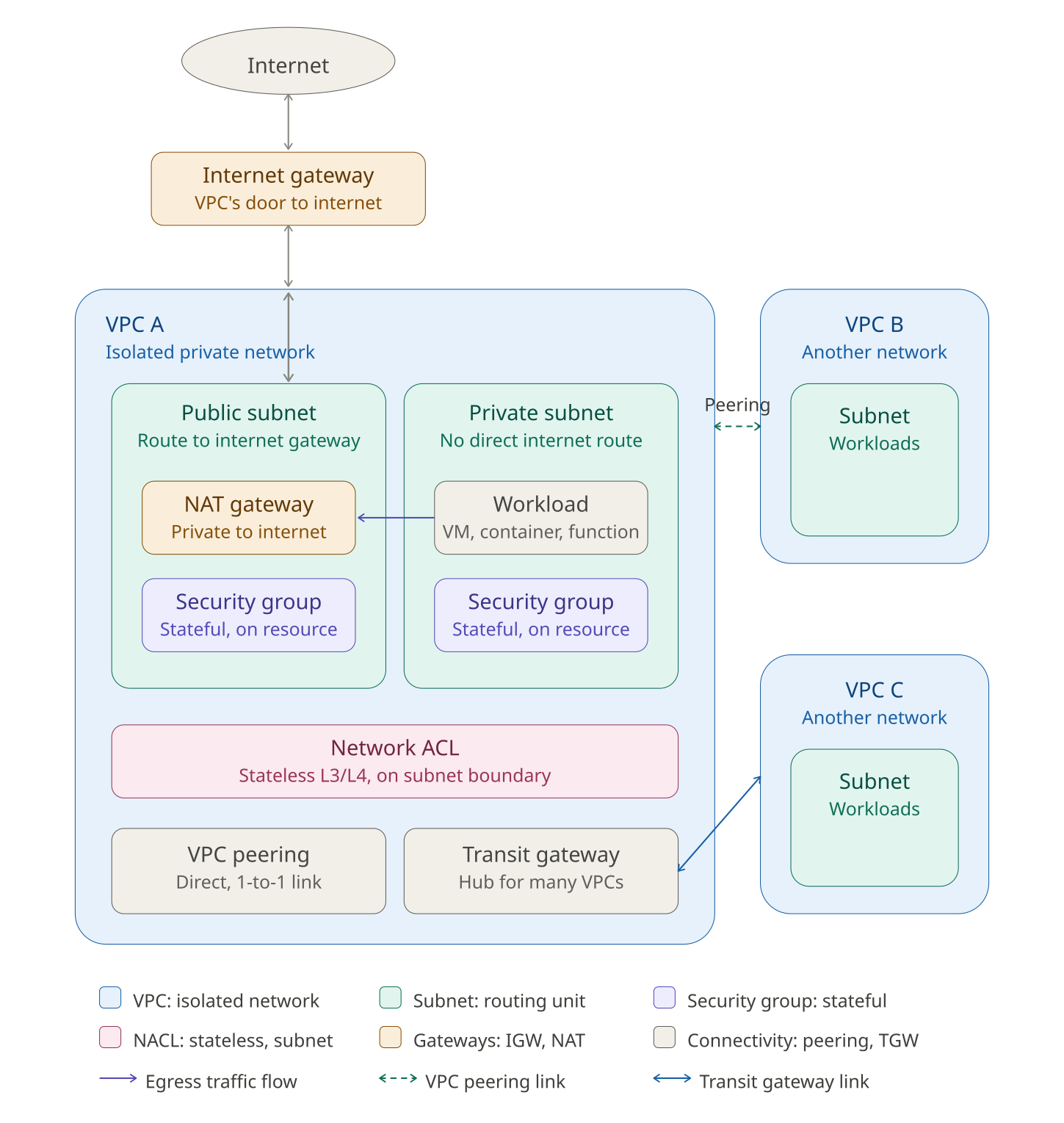
- VPC: isolated private network.
- Subnets: routing units.
- Security Groups: stateful firewalls.
- NACLs: stateless L3/L4 ACLs.
- Internet Gateway: outbound internet.
- NAT Gateway: private → internet.
- VPC Peering: L3 connection between VPCs.
- Transit Gateway: central hub for multi-VPC.
Kubernetes Networking (very common in interviews)#
- Nodes must be able to reach each Pod (L3).
- Pod gets separate IP.
- No NAT between Pods in cluster.
- CNI plugins: Calico, Cilium, Flannel, Weave.
- Services expose stable virtual IP (iptables or IPVS).
- Ingress manages L7 HTTP routing.
- Kube-proxy handles L4 load balancing.
- Cilium/Envoy handle advanced L7 policy & mesh.
Networking interview questions#
1. What is the difference between TCP and UDP?#
TCP is connection-oriented, reliable, ordered, with congestion control. UDP is connectionless, faster, no guarantees, ideal for DNS/VoIP/streaming.
2. What is MTU and why does it matter?#
MTU (Maximum Transmission Unit) is the largest packet size allowed. Wrong MTU → fragmentation → performance problems. Example: 1500 (Ethernet), 9000 (Jumbo frames).
3. What is Path MTU Discovery (PMTUD)?#
Technique where hosts discover the smallest MTU along a path to avoid fragmentation. Uses ICMP “Fragmentation Needed” messages.
4. What is the 3-way TCP handshake?#
- SYN
- SYN-ACK
- ACK Establishes sequence numbers and synchronizes both directions.
5. What is TCP Fast Open (TFO)?#
Optimization allowing data to be sent in the initial SYN packet → reduces latency for repeated connections.
6. Difference between HTTP/1.1, HTTP/2, and HTTP/3?#
- HTTP/1.1 – multiple connections, head-of-line blocking.
- HTTP/2 – multiplexing over TCP, binary framing.
- HTTP/3 – runs over QUIC (UDP) → zero-RTT, no TCP HOL blocking.
7. What is ARP and how does ARP spoofing work?#
ARP maps IP → MAC in local networks. ARP spoofing injects fake ARP replies → traffic redirection / MITM.
8. What is a VLAN and why use it?#
Virtual LAN segments a physical network into isolated logical networks → improves security, performance, and broadcast domain control.
9. What is a subnet and why subnetting?#
Subnet = logical subdivision of a network. Used for routing efficiency, isolation, IP conservation.
10. What is CIDR notation?#
Classless Inter-Domain Routing.
Example: 192.168.1.0/24 → 256 addresses.
Controls network size and routing aggregation.
11. What are L2 and L3 switches?#
- L2 switch → MAC-based forwarding.
- L3 switch → adds routing capability using IP, runs routing protocols.
12. What is a broadcast storm?#
Overwhelming number of broadcast frames (e.g., ARP). Causes network congestion; prevented by VLANs, STP, rate-limiting.
13. What is STP (Spanning Tree Protocol)?#
Protocol preventing L2 loops by disabling some switch ports to form a loop-free tree.
14. What is BGP and why is it important?#
Border Gateway Protocol → manages routing between autonomous systems on the Internet. Critical for global routing, traffic engineering, multi-homing.
15. What is BGP Route Flapping?#
Routes repeatedly going up/down. Causes instability → mitigated by Route Dampening.
16. What is ECMP (Equal Cost Multi Path)?#
Technique where multiple routes with equal cost are used concurrently → improves throughput and redundancy.
17. What is NAT and its types?#
Network Address Translation: private → public IP. Types:
- SNAT (Source NAT)
- DNAT (Destination NAT)
- PAT (Port Address Translation)
18. What is a Load Balancer at L4 vs L7?#
- L4 → TCP/UDP, faster, no application awareness.
- L7 → HTTP/HTTPS-aware, routing by path/header/cookie.
19. What is SDN (Software-Defined Networking)?#
Separates control plane (brain) from data plane (packet forwarding). Gives programmable, centralized network management.
20. What is DNS recursion vs iteration?#
- Recursion → DNS server performs full lookup until final answer.
- Iteration → Server returns referrals; client continues querying.
21. What is DNS TTL and why is it critical?#
TTL controls how long DNS responses are cached. Low TTL → fast failover, more load. High TTL → stable, slower updates.
22. What is Anycast and why is it used?#
Multiple servers share the same IP; traffic goes to the nearest instance. Used for CDNs, DNS, DDoS mitigation.
23. What is a TCP half-open connection?#
State after SYN-ACK but before final ACK. Used in SYN flood attacks → consume server resources.
24. What is QUIC and why is it faster?#
UDP-based transport by Google with:
- 0-RTT handshakes
- No head-of-line blocking
- Built-in encryption
25. What is DHCP and how does the DORA process work?#
DORA:
- Discover
- Offer
- Request
- Acknowledge
26. What is IPsec and how does it work?#
Protocol suite for secure IP communication. Uses AH (Authentication Header) and ESP (Encapsulating Security Payload). Modes: Transport and Tunnel.
27. What is MPLS and why is it used?#
Multi-Protocol Label Switching routes packets using labels instead of IP lookups → faster, supports VPNs and traffic engineering.
28. What is a FIB vs RIB?#
- RIB (Routing Information Base) → all learned routes.
- FIB (Forwarding Information Base) → optimized table used for actual packet forwarding.
29. What is SYN Cookie?#
Technique to prevent SYN flood attacks by encoding state inside the SYN-ACK sequence number → no need to allocate memory until final ACK.
30. What is VXLAN?#
Virtual eXtensible LAN: overlays L2 networks over L3 using UDP. Used in cloud/Kubernetes for multi-tenant isolation and large-scale networks.
Related topics#
- DevOps & SRE interview questions — main page
- Kubernetes — Kubernetes CNI, service networking, NetworkPolicies
- Linux — iptables, namespaces, sockets
- AWS & cloud concepts — VPC, ALB, Route 53, Security Groups
- Docker and container runtimes — container networking modes
- Kafka, NATS, and messaging — distributed systems networking