Networking core concepts#
OSI Model (7 layers)#
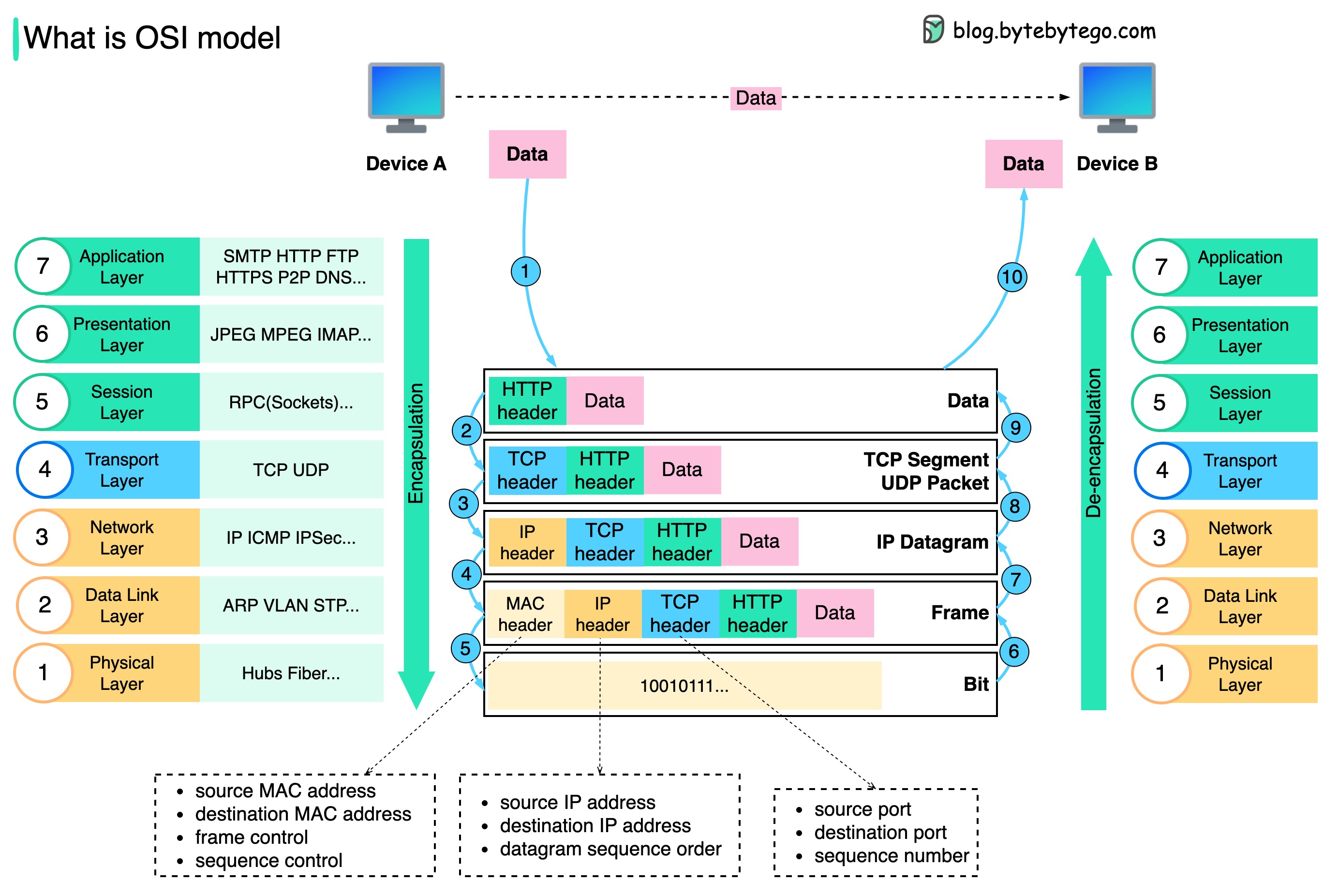
- L1 – Physical: Cables, NICs, bits.
- L2 – Data Link: MAC addresses, switches, VLANs, STP.
- L3 – Network: IP, routing, subnets, CIDR, ARP.
- L4 – Transport: TCP/UDP, ports, handshake, retransmission.
- L5 – Session: Connection management. Rare in practical ops.
- L6 – Presentation: Encryption, compression, TLS framing.
- L7 – Application: HTTP, DNS, SMTP, gRPC.
Key Interview Tip#
- OSI layers help troubleshoot: “Which layer is failing?”
- Map protocols to layers (HTTP → L7, TLS → L6, IP → L3, etc).
TCP/IP Model (4 layers)#
- Link (L1–L2): Ethernet, ARP.
- Internet (L3): IP, ICMP, routing.
- Transport (L4): TCP/UDP.
- Application (L5–L7): HTTP, DNS, SSH.
Important Concepts#
- TCP: reliable, handshake, congestion control.
- UDP: fast, no guarantee, used for DNS, streaming, VoIP.
- ICMP: used for ping/traceroute, path discovery.
IP Addressing#
- CIDR: /24 = 256 hosts, /16 = 65k hosts.
- Subnetting: dividing network segments for isolation/performance.
- Private IP ranges: 10/8, 172.16/12, 192.168/16.
- VPC (cloud): routed private networks; no L2 broadcast.
Routing & Switching#
Switching (L2)#
- Forwards frames by MAC table.
- VLAN segments networks.
- STP prevents loops (root bridge, blocked ports).
Routing (L3)#
- Routers forward packets using routing tables.
- Static routing: manual.
- Dynamic routing: BGP, OSPF.
- NAT: translates internal IP → public IP (SNAT, DNAT).
DNS Essentials#
- Converts names → IP.
- Record types: A, AAAA, CNAME, MX, TXT, NS, SRV.
- TTL controls caching.
- Common issue: stale DNS caches.
- Use
dig,nslookup,host.
HTTP/HTTPS Essentials#
- Stateless, request/response.
- Methods: GET, POST, PUT, PATCH, DELETE.
- Status codes: 2xx OK, 3xx redirect, 4xx client error, 5xx server error.
- HTTPS adds TLS handshake + encryption.
TLS#
- Uses asymmetric cryptography for handshake.
- Certificates: chain, CA, trust store.
Load Balancing#
OSI Layers#
- L4 LB (Transport): TCP/UDP based. HAProxy, NLB, LVS/IPVS.
- L7 LB (Application): HTTP-aware. Nginx, Envoy, ALB, Traefik.
Key Algorithms#
- Round-robin.
- Least connections.
- Weighted round-robin.
- IP-hash (sticky).
- Random with two-choices (modern default).
Key Features#
- Health checks (HTTP/TCP).
- Session persistence.
- TLS termination/offloading.
- Rate limiting, WAF (L7 only).
- Connection draining.
Reverse & Forward Proxies#
Reverse Proxy#
- Client → proxy → backend service.
- Used for load balancing, caching, TLS termination, auth.
- Examples: Nginx, Envoy, Traefik, HAProxy.
Forward Proxy#
- Client → proxy → arbitrary internet.
- Used for egress control, filtering, anonymity.
- Examples: Squid, corporate proxies.
NAT & Firewall Basics#
NAT Types#
- SNAT: internal → external.
- DNAT: external → internal.
- PAT/Masquerade: many → one IP.
Firewalls#
- L3/L4 filtering: IP, port, protocol.
- Stateful vs stateless.
- Tools: iptables, nftables, ufw, AWS SG/NACL.
TCP Essentials#
- 3-way handshake: SYN → SYN/ACK → ACK.
- Flags: SYN, ACK, FIN, RST, PSH.
- Slow start: congestion control.
- Retransmissions when packets drop.
- Keepalive prevents dead connections.
Common Issues#
- SYN backlog full → connection timeouts.
- High RTT → slow performance.
- MTU mismatch → packet fragmentation/blackholes.
UDP Essentials#
- Unreliable, unordered, no retransmits.
- Used for DNS, video, VoIP, QUIC.
- No handshake → low latency.
MTU & Packet Fragmentation#
- Default Ethernet MTU: 1500 bytes.
- Tunnel/VPN reduces MTU.
- PMTUD helps discover correct MTU.
- Wrong MTU → “can’t load some websites”, “stalled connections”.
VPN & Tunneling#
- Encapsulate traffic across networks.
- Types: IPSec, WireGuard, OpenVPN.
- Overhead reduces MTU.
- Often used for inter-VPC or DC-to-DC secure links.
1. OpenVPN#
The classic, battle-tested one
- Creates an encrypted tunnel over TCP or UDP.
- Uses TLS certificates (like HTTPS) to authenticate and encrypt traffic.
- Very configurable and secure, but a bit heavy and slower than newer options.
Think of it as a secure armored truck — reliable, proven, but not the fastest.
2. WireGuard#
The modern, fast, minimalist VPN
- Uses state-of-the-art cryptography with very little code.
- Works by exchanging public keys (similar to SSH).
- Keeps the tunnel simple → faster speeds, lower latency, fewer bugs.
Think of it as a secure racing bike — light, fast, elegant.
3. IPsec / IKEv2#
The enterprise-grade, stable VPN
- IPsec encrypts traffic at the network layer.
- IKEv2 handles key exchange and reconnection.
- Very good at handling network changes (Wi-Fi ↔ mobile).
Think of it as a smart highway system — strong, stable, great for mobile users.
4. L2TP/IPsec#
The older combo protocol
- L2TP creates the tunnel, IPsec adds encryption.
- Secure, but slower because data is wrapped twice.
- Mostly kept for legacy support.
Think of it as two envelopes around your data — safe, but bulky.
5. PPTP#
The outdated one (avoid it)
- Very fast but uses broken encryption.
- Easy to block and easy to break.
- Not considered secure anymore.
Think of it as a paper lock — better than nothing, but not safe.
6. SSTP#
Microsoft’s VPN
- Runs over HTTPS (TCP 443).
- Hard to block because it looks like normal web traffic.
- Mostly used on Windows systems.
Think of it as VPN disguised as HTTPS.
7. SoftEther#
The flexible multi-protocol VPN
- Can mimic HTTPS, OpenVPN, L2TP, etc.
- Designed to bypass firewalls and censorship.
- Very versatile but more complex to run.
Think of it as a VPN chameleon.
Quick summary table#
| Protocol | Speed | Security | Best use case |
|---|---|---|---|
| WireGuard | Very fast | Very strong | Modern VPNs, cloud, devs |
| OpenVPN | Medium | Very strong | Proven, configurable setups |
| IKEv2/IPsec | Fast | Strong | Mobile, enterprise |
| L2TP/IPsec | Slower | Strong | Legacy systems |
| SSTP | Medium | Strong | Windows, restrictive networks |
| PPTP | Fast | Weak | Avoid |
TLDR#
- Want speed + simplicity? → WireGuard
- Want maximum compatibility? → OpenVPN
- On mobile networks? → IKEv2/IPsec
- Old systems? → L2TP/IPsec
- Avoid PPTP
CDN Basics#
- Edge caching.
- Reduces latency and origin load.
- Key concepts: cache hit ratio, TTL, purge, invalidation.
Caching#
- Local caching: DNS, HTTP, OS caches.
- Proxy caching: Nginx/Envoy/Cloudflare.
- Cache-control headers: max-age, no-cache, etag.
Service Discovery#
- DNS-based (Kubernetes).
- Consul, etcd, Eureka.
- K8s: kube-dns / CoreDNS.
Common DevOps Networking Tools#
ping: reachability.traceroute,mtr: routing path.ss,netstat: sockets and ports.tcpdump,wireshark: packet capture.curl,wget: HTTP debug.dig,nslookup: DNS.nmap: port scanning.nc(netcat): TCP/UDP testing.iperf: bandwidth testing.
Cloud Networking Basics#
- VPC: isolated private network.
- Subnets: routing units.
- Security Groups: stateful firewalls.
- NACLs: stateless L3/L4 ACLs.
- Internet Gateway: outbound internet.
- NAT Gateway: private → internet.
- VPC Peering: L3 connection between VPCs.
- Transit Gateway: central hub for multi-VPC.
Kubernetes Networking (very common in interviews)#
- Nodes must be able to reach each Pod (L3).
- Pod gets separate IP.
- No NAT between Pods in cluster.
- CNI plugins: Calico, Cilium, Flannel, Weave.
- Services expose stable virtual IP (iptables or IPVS).
- Ingress manages L7 HTTP routing.
- Kube-proxy handles L4 load balancing.
- Cilium/Envoy handle advanced L7 policy & mesh.
Networking interview questions#
1. What is the difference between TCP and UDP?#
TCP is connection-oriented, reliable, ordered, with congestion control. UDP is connectionless, faster, no guarantees, ideal for DNS/VoIP/streaming.
2. What is MTU and why does it matter?#
MTU (Maximum Transmission Unit) is the largest packet size allowed. Wrong MTU → fragmentation → performance problems. Example: 1500 (Ethernet), 9000 (Jumbo frames).
3. What is Path MTU Discovery (PMTUD)?#
Technique where hosts discover the smallest MTU along a path to avoid fragmentation. Uses ICMP “Fragmentation Needed” messages.
4. What is the 3-way TCP handshake?#
- SYN
- SYN-ACK
- ACK Establishes sequence numbers and synchronizes both directions.
5. What is TCP Fast Open (TFO)?#
Optimization allowing data to be sent in the initial SYN packet → reduces latency for repeated connections.
6. Difference between HTTP/1.1, HTTP/2, and HTTP/3?#
- HTTP/1.1 – multiple connections, head-of-line blocking.
- HTTP/2 – multiplexing over TCP, binary framing.
- HTTP/3 – runs over QUIC (UDP) → zero-RTT, no TCP HOL blocking.
7. What is ARP and how does ARP spoofing work?#
ARP maps IP → MAC in local networks. ARP spoofing injects fake ARP replies → traffic redirection / MITM.
8. What is a VLAN and why use it?#
Virtual LAN segments a physical network into isolated logical networks → improves security, performance, and broadcast domain control.
9. What is a subnet and why subnetting?#
Subnet = logical subdivision of a network. Used for routing efficiency, isolation, IP conservation.
10. What is CIDR notation?#
Classless Inter-Domain Routing.
Example: 192.168.1.0/24 → 256 addresses.
Controls network size and routing aggregation.
11. What are L2 and L3 switches?#
- L2 switch → MAC-based forwarding.
- L3 switch → adds routing capability using IP, runs routing protocols.
12. What is a broadcast storm?#
Overwhelming number of broadcast frames (e.g., ARP). Causes network congestion; prevented by VLANs, STP, rate-limiting.
13. What is STP (Spanning Tree Protocol)?#
Protocol preventing L2 loops by disabling some switch ports to form a loop-free tree.
14. What is BGP and why is it important?#
Border Gateway Protocol → manages routing between autonomous systems on the Internet. Critical for global routing, traffic engineering, multi-homing.
15. What is BGP Route Flapping?#
Routes repeatedly going up/down. Causes instability → mitigated by Route Dampening.
16. What is ECMP (Equal Cost Multi Path)?#
Technique where multiple routes with equal cost are used concurrently → improves throughput and redundancy.
17. What is NAT and its types?#
Network Address Translation: private → public IP. Types:
- SNAT (Source NAT)
- DNAT (Destination NAT)
- PAT (Port Address Translation)
18. What is a Load Balancer at L4 vs L7?#
- L4 → TCP/UDP, faster, no application awareness.
- L7 → HTTP/HTTPS-aware, routing by path/header/cookie.
19. What is SDN (Software-Defined Networking)?#
Separates control plane (brain) from data plane (packet forwarding). Gives programmable, centralized network management.
20. What is DNS recursion vs iteration?#
- Recursion → DNS server performs full lookup until final answer.
- Iteration → Server returns referrals; client continues querying.
21. What is DNS TTL and why is it critical?#
TTL controls how long DNS responses are cached. Low TTL → fast failover, more load. High TTL → stable, slower updates.
22. What is Anycast and why is it used?#
Multiple servers share the same IP; traffic goes to the nearest instance. Used for CDNs, DNS, DDoS mitigation.
23. What is a TCP half-open connection?#
State after SYN-ACK but before final ACK. Used in SYN flood attacks → consume server resources.
24. What is QUIC and why is it faster?#
UDP-based transport by Google with:
- 0-RTT handshakes
- No head-of-line blocking
- Built-in encryption
25. What is DHCP and how does the DORA process work?#
DORA:
- Discover
- Offer
- Request
- Acknowledge
26. What is IPsec and how does it work?#
Protocol suite for secure IP communication. Uses AH (Authentication Header) and ESP (Encapsulating Security Payload). Modes: Transport and Tunnel.
27. What is MPLS and why is it used?#
Multi-Protocol Label Switching routes packets using labels instead of IP lookups → faster, supports VPNs and traffic engineering.
28. What is a FIB vs RIB?#
- RIB (Routing Information Base) → all learned routes.
- FIB (Forwarding Information Base) → optimized table used for actual packet forwarding.
29. What is SYN Cookie?#
Technique to prevent SYN flood attacks by encoding state inside the SYN-ACK sequence number → no need to allocate memory until final ACK.
30. What is VXLAN?#
Virtual eXtensible LAN: overlays L2 networks over L3 using UDP. Used in cloud/Kubernetes for multi-tenant isolation and large-scale networks.